Creating TVT/TST projections
With the Create TVT/TST projection form (Prepare > Wells) you can create a TVT/TST projection based on the output of the Calculate Dip & Dip Azimuth form. In this step, true vertical and true stratigraphic thicknesses are calculated and saved to a 'projection'. This 'projection' is not accessible in the JewelExplorer and can only be accessed through the drop-down list on this form.
When this step is finalized, TVT or TST projection modes become available in the Well View. There, you can select them, in combination with the projection you just created, to display missing sections or generate multiple tracks for overlapping sections. Note that you have to manually enter the thickness of the missing or overlapping section in the Missing column of the Marker Table to see the effect in the Well View.
Creating a TVT/TST projection
- In the drop-down box at the top of the form select Create new.
- Type in a name for the new projection in the adjacent text box.
- Depending on the source you want to use as input for the operation, select either Marker Properties or Logs.
- In the drop-down box select the marker set or log to use as the input for the projection.
- Click Apply to create the projection and keep the form open. Click OK to create the projection. In the Well View toolbar, TVT an TST projection modes are now available (under Measure) and the projection can be retrieved from the adjacent drop-down box.
- Optionally, you can proceed to the Calculate Inflections form, if you want to calculate inflection points.
Managing your projections
You can copy, rename and delete projections using the buttons on the form adjacent to the TVT/TST projection drop-down box. To perform any of these management functions, select the projection of interest in the drop down box and click the appropriate button:
 Copies the active projection and appends 'Copy' to the name. For example, copying 'Projection 1' will result in a new projection named 'Projection 1 - Copy'.
 Rename the active projection.
 Delete the projection and optionally also delete the associated TVT/TST data.
TVT/TST Calculation
For deviated wells and/or dipping formations, the true vertical thickness and true stratigraphic thickness are calculated based on intervals. These intervals are defined by 'trajectory station points' along the wellbore. Each point has a specific dip value. The application inserts 'temporary planes' at each station point, based on the station's dip. In this way, the space between two markers is divided into smaller zones. The thickness is then calculated from one 'temporary plane' to the other. At the end, the thickness of each interval is added to give one thickness value for the entire zone. The 'trajectory station points' between markers allows for more accurate estimations of the total zone thickness, as the additional dipping planes act like a correction factor.
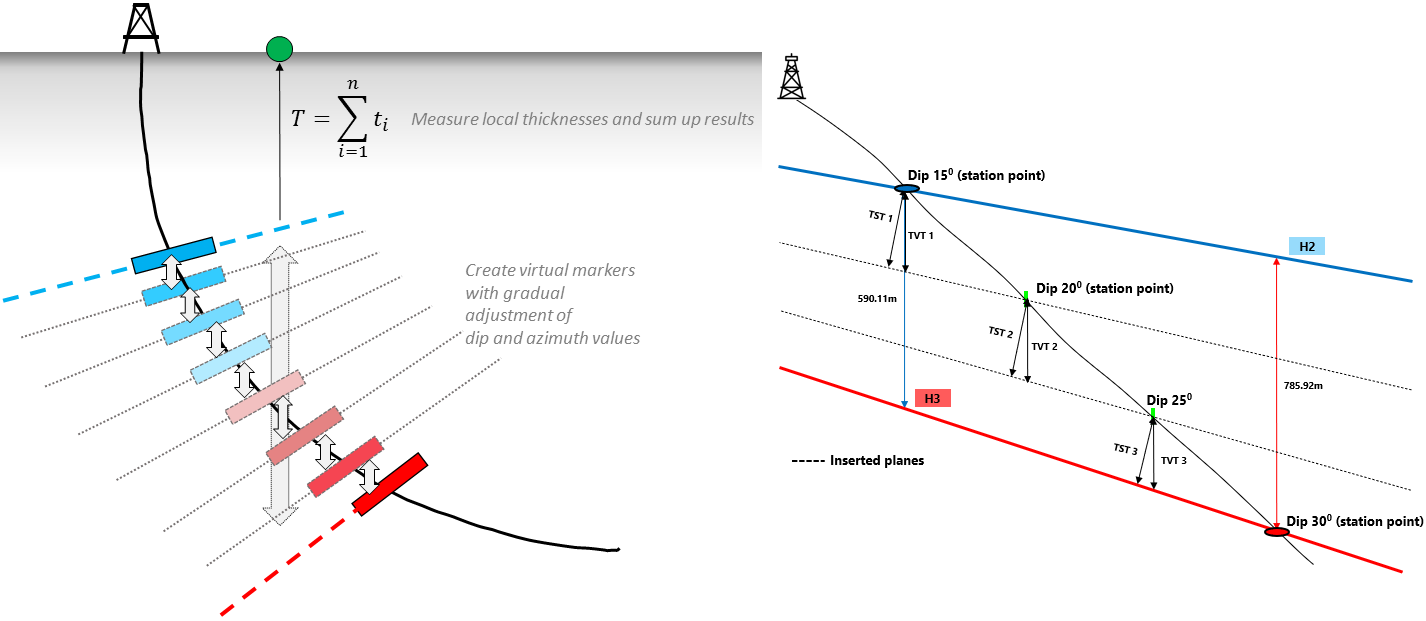
For a dipping formation and a deviated wellbore, the total thickness is the cumulative thickness of each interval (the intervals are smaller zones between 'trajectory station points'). click to enlarge